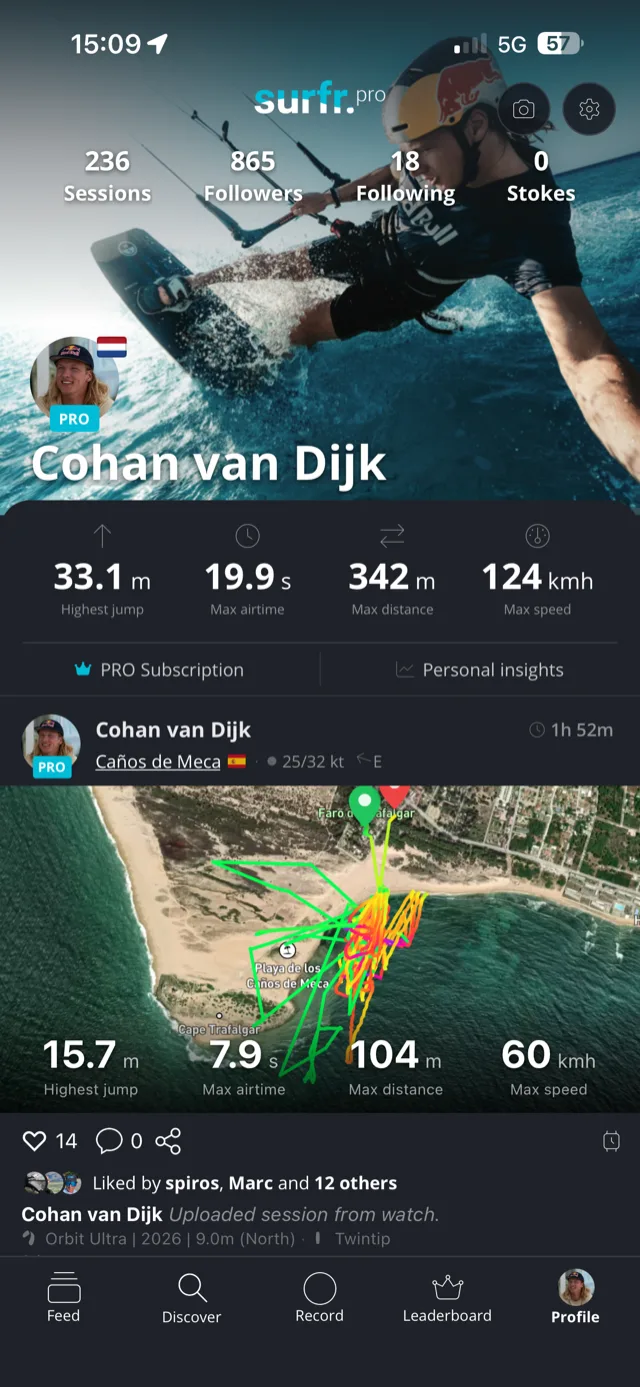
Your Garmin just became a Surfr.
Live jump heights on 70 Garmin watches, speed and GPS tracking on 15 more. On the models with room for it, your own kites and spots on your wrist, Downwinder navigation, and friends who can see you out there.
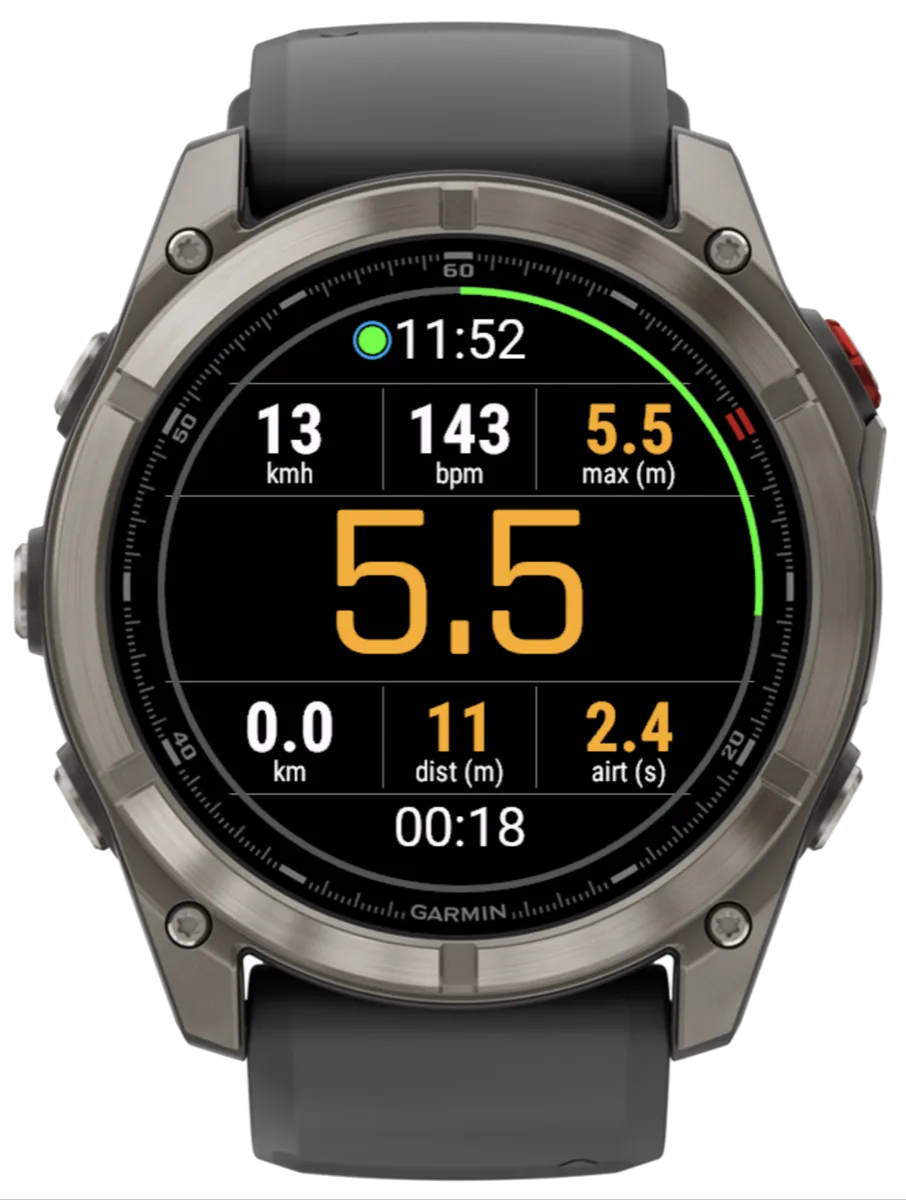
Live jump tracking, right on your wrist.
Jump height, airtime, and distance in real time as you ride, on every supported Garmin. Leave the phone on the beach. The watch does the tracking.
Pick your mode before you start. Big Air puts the jump height front and centre. Speed swaps it for your current speed, and the jump widgets step aside until you switch back.
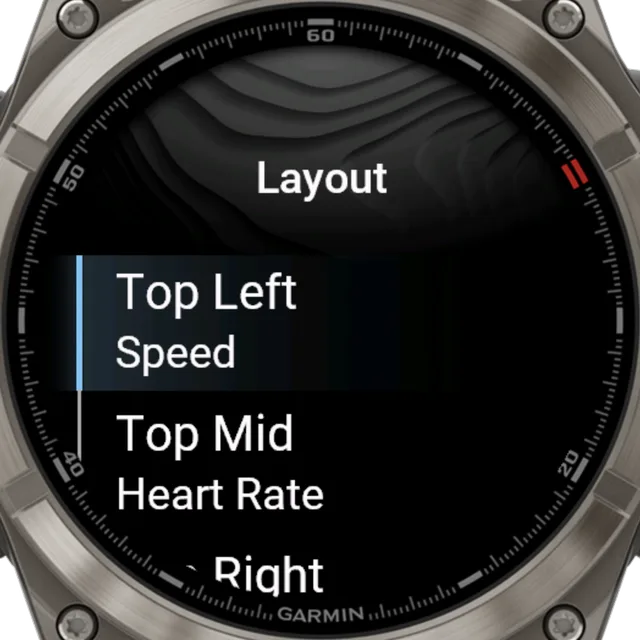
Six slots. Ten metrics. Your call.
Three widgets above the big number, three below, and you choose what goes in every one of them. Heart rate, last height, max height, speed, airtime, jump distance, distance kited, max speed, jump count, and friends nearby on live watches. Or leave a slot empty.
Land a jump and the jump metrics flash so you catch them mid session. The layout scales to every screen size and shape, and Instinct-style watches promote a value into the round subscreen.
Your account, your kites, your spots.
Pair your Surfr account once with a 6-digit code. Your quiver and your local spots arrive on the watch by themselves.
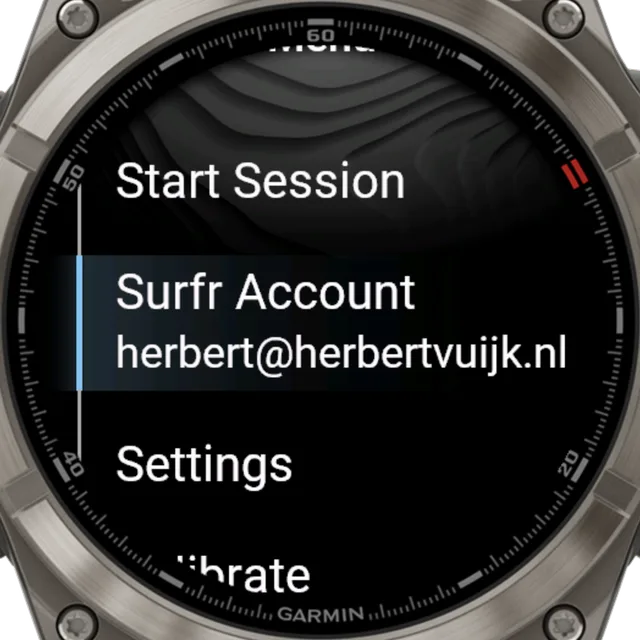
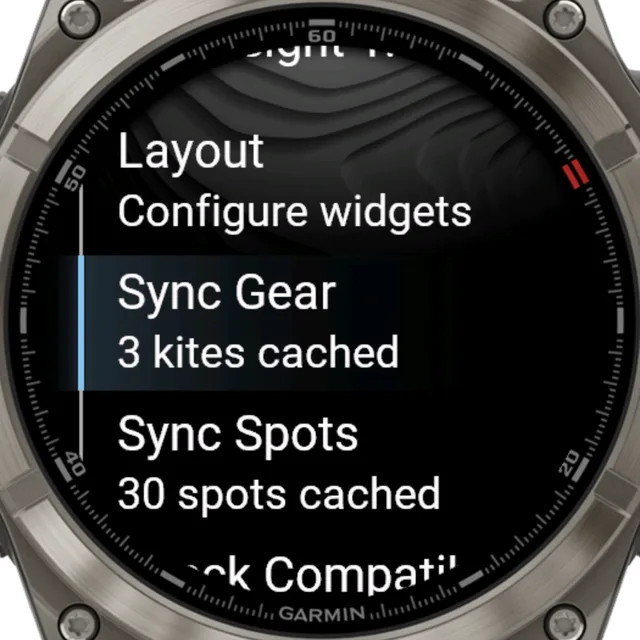
Pair in seconds
Get a 6-digit code in the Surfr app, tap it in on the watch, done. Your subscription and account show up in the menu and refresh every time you open the app.
Your quiver, on your wrist
Up to 30 kites sync from your Surfr account, already named and sorted. Pick the one you are on before you start and it travels with the session.
Spots that follow you
Nearby spots sync automatically. Travel more than 10 km from your last sync and the watch refreshes on its own, so a new destination just works.
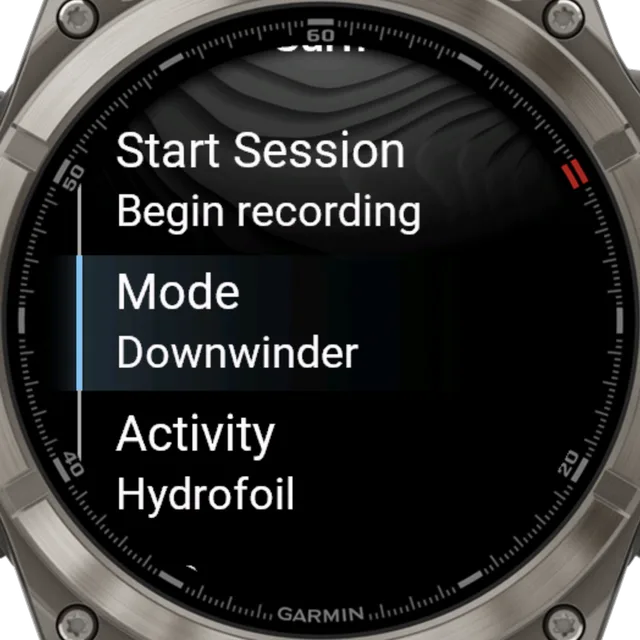
Set your kite, activity and mode before you start and every session lands in Surfr already tagged. Seven activities are supported: twintip, hydrofoil, wing, directional, windsurf, snowkite and landboard, each recorded with the right Garmin sport type.
Point the watch down the coast.
The Apple Watch favourite is on Garmin. Pick a destination and ride to it.
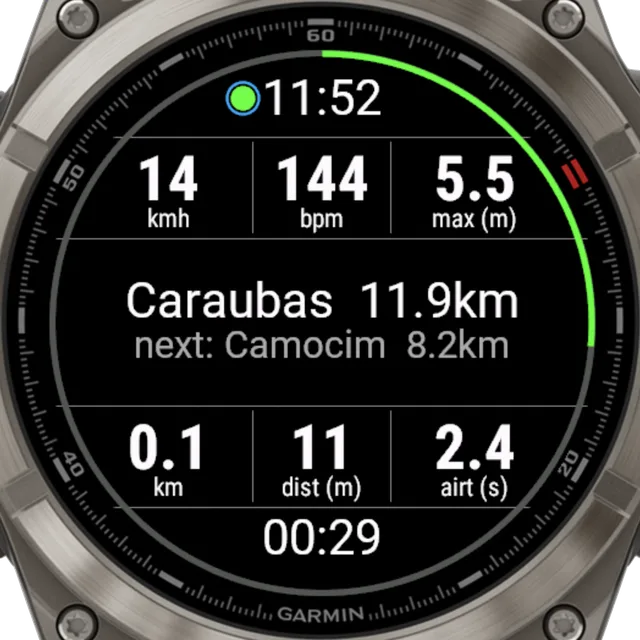
Your destination sits front and centre with live distance, and the watch works out which spot is genuinely on the way so you always know what is coming next. A progress ring fills clockwise around the face as you close in.
Jumps still count. Land one and the big height reading takes over for fifteen seconds before navigation slides back, with the ring updating the whole time.
Downwinder is a premium feature on Connected + Live watches and needs a linked Surfr account. Free riders get three tries on the watch.
Out there, within reach.
On Connected + Live watches, every session broadcasts by itself and your friends on the water can reach you.
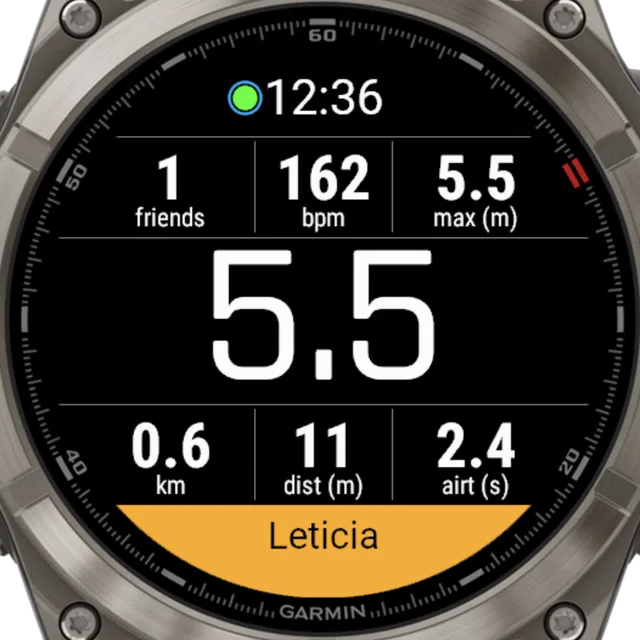
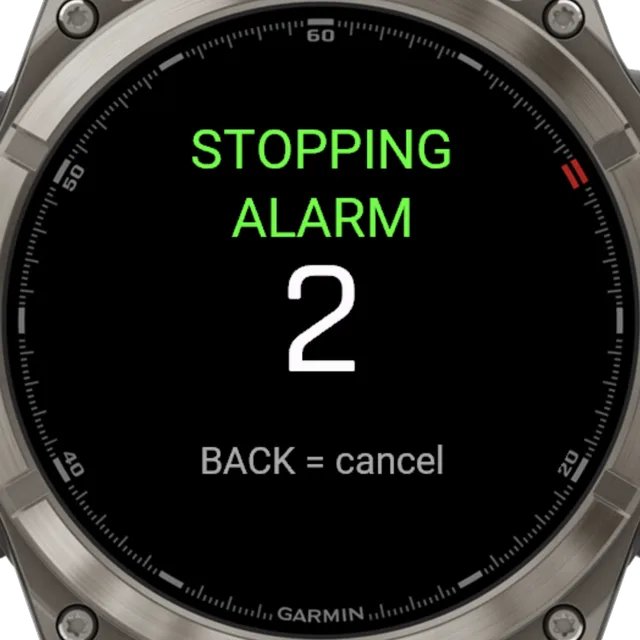
Live by default
Link your account once and every session broadcasts on its own. Position, jumps, speed and heart rate go out roughly every 15 seconds, instantly when you land. A green dot tells you it is getting through, and anything missed while offline is delivered when you reconnect.
Friend Alarm
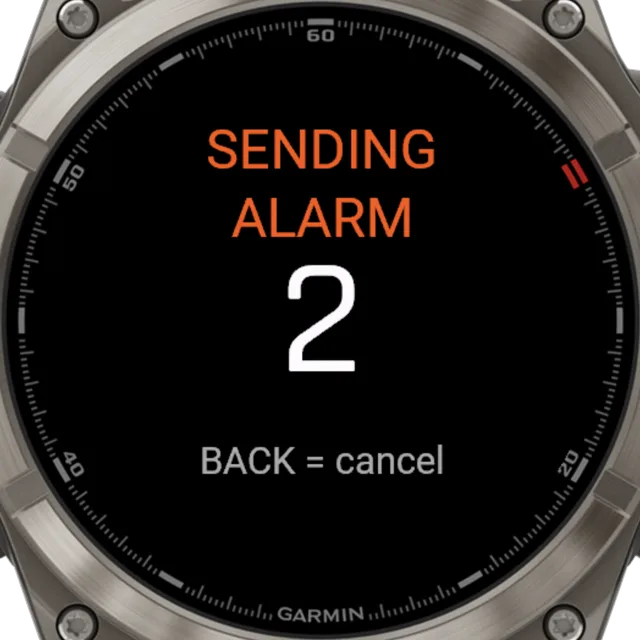
Triple-press DOWN while recording and every friend broadcasting nearby gets a full-screen alert with your name and how far away you are. It buzzes until they acknowledge it and never times out on its own. It alerts your friends, not the emergency services.
Are you OK?
With the safety beacon armed in your Surfr profile, the backend watches your track. Stop moving or drop off the map and your watch asks if you are OK. Any key answers it, and a triple-press raises the alarm instead.
Privacy is layered. Nothing broadcasts without a linked account, friends only see each other when both are broadcasting, and visibility is limited to riders close by. The Friends Nearby widget shows how many friends are out within that range.
Fast sync, then the full picture.
The moment you stop, your watch syncs to the Surfr app in seconds. Your ride is ready to explore.
Seamless sync
Your session moves from watch to app automatically, with your kite, activity, mode and spot already attached. No cables, no export, no tagging afterwards.
PRO Insights
Open the map, replay every jump, and dig into GPS detail. PRO unlocks the deepest session analytics.
Set up your Garmin in a few steps.
The Surfr Connect IQ app handles the sync. Here is the whole setup.
Install the Connect IQ app
Open Garmin Connect, go to the Connect IQ Store, and search for “The Surfr App”. Install it on your watch.
Connect your Garmin account
In Surfr, open the Session page, tap the settings icon, and choose Connect Garmin Account.
Pair your Surfr account
In Surfr, go to Profile, Settings, Connections, Pair Watch for a 6-digit code. Enter it on the watch and your gear and spots sync straight away.
Calibrate before you ride
Do the quick wrist calibration in a stable spot before your first session. It takes a few seconds.
Step three applies to Connected + Live and Basic watches. On Essentials watches, recording works straight after step two.
Three categories, one answer.
Garmin watches differ in how much app memory they have and in which motion sensors apps can read, so features arrive in three categories. 126 watches run the new app; the oldest 96KB models use the Surfr Legacy app instead.
132 Garmin models supported
| Capability | Legacy app6 models | Essentials3 models | Basic15 models | Connected + Live108 models |
|---|---|---|---|---|
| Speed, distance and GPS session recording | ||||
| Jump tracking with live jump heights on your wrist1 | ||||
| Surfr account linking | ||||
| Kite selection from your synced quiver | ||||
| Spot sync and Downwinder mode | ||||
| Live broadcasting | ||||
| Friend Alarm | ||||
| Friends Nearby widget |
1 On the 2019 and 2020 sensor generation, live heights turn on after a one-time sensor check during onboarding. Watches that run the check: Enduro, fenix 6, fenix 6 Pro, fenix 6S, fenix 6S Pro, fenix 6X Pro, quatix 6, quatix 6X, tactix Delta Sapphire, tactix Delta Solar, tactix Delta Solar Ballistics Edition. Every other Essentials and Connected + Live model shows live heights straight away.
Basic watches skip the check — their sensors can't measure jumps, so they record speed and GPS sessions without jump heights.
Legacy app6 models
The new app doesn't run on these watches — on them it shows a short notice instead. The previous app, Surfr Legacy, keeps working there and is available at thesurfr.app/garminlegacy.
- Descent G1 (incl. G1 Solar)
- Forerunner 245
- Instinct 2 (incl. Solar / Dual Power / dēzl Edition)
- Instinct 2S (incl. Solar / Dual Power)
- Instinct 2X
- Instinct Crossover
Essentials3 models
The complete recording experience: jump and speed tracking, activity files, and session upload through Garmin Connect.
- Enduro
- fenix 6
- fenix 6S
Basic15 models
Speed & GPS recording. These models don't give apps the motion-sensor stream needed to measure jumps, so they record speed, distance and your full GPS track — without jump heights, live or afterwards. Sessions sync to the Surfr app as normal, the connected and live features all work, and these models are never asked to subscribe: speed recording needs no subscription.
- Approach S50
- Forerunner 170
- Forerunner 170 Music
- Forerunner 245 Music
- Forerunner 745
- Forerunner 945
- Forerunner 945 LTE
- Legacy Hero Captain Marvel
- Legacy Hero First Avenger
- Legacy Saga Darth Vader
- Legacy Saga Rey
- Venu
- vívoactive 4
- vívoactive 4S
- vívoactive 5
Connected + Live108 models
The full feature set: everything in Essentials, plus Surfr account linking, kite selection from your synced quiver, spot sync with Downwinder mode, live broadcasting, Friend Alarm, and the Friends Nearby widget.
- Approach S70 42mm
- Approach S70 47mm
- D2 Air X10
- D2 Air X15
- D2 Mach 1
- D2 Mach 1 Pro
- D2 Mach 2
- D2 Mach 2 Pro
- Descent G2
- Descent Mk2
- Descent Mk2S
- Descent Mk2i
- Descent Mk3 43mm
- Descent Mk3 51mm
- Descent Mk3i 43mm
- Enduro 2
- Enduro 3
- Forerunner 255
- Forerunner 255 Music
- Forerunner 255S
- Forerunner 255S Music
- Forerunner 265
- Forerunner 265S
- Forerunner 570 42mm
- Forerunner 570 47mm
- Forerunner 955
- Forerunner 955 Solar
- Forerunner 965
- Forerunner 970
- Instinct 3 AMOLED 45mm
- Instinct 3 AMOLED 50mm
- Instinct 3 Solar 45mm
- Instinct 3 Solar 50mm
- Instinct Crossover AMOLED
- MARQ (Gen 2)
- MARQ (Gen 2) Adventurer
- MARQ (Gen 2) Athlete
- MARQ (Gen 2) Captain
- MARQ (Gen 2) Commander (Carbon Edition)
- MARQ (Gen 2) Golfer
- MARQ Adventurer
- MARQ Athlete
- MARQ Aviator
- MARQ Aviator (Gen 2)
- MARQ Captain
- MARQ Captain: American Magic Edition
- MARQ Commander
- MARQ Driver
- MARQ Expedition
- MARQ Golfer
- Venu 2
- Venu 2 Plus
- Venu 2S
- Venu 3
- Venu 3S
- Venu 4 41mm
- Venu 4 45mm
- Venu X1
- epix (Gen 2)
- epix Pro (Gen 2) 42mm
- epix Pro (Gen 2) 47mm
- epix Pro (Gen 2) 51mm
- fenix 6 Pro
- fenix 6S Pro
- fenix 6X Pro
- fenix 7
- fenix 7 Pro
- fenix 7 Pro (no Wi-Fi)
- fenix 7S
- fenix 7S Pro
- fenix 7X
- fenix 7X Pro
- fenix 7X Pro (no Wi-Fi)
- fenix 8 43mm
- fenix 8 47mm
- fenix 8 51mm
- fenix 8 Pro 47mm
- fenix 8 Pro 51mm
- fenix 8 Pro MicroLED
- fenix 8 Solar 47mm
- fenix 8 Solar 51mm
- fenix 9 43mm
- fenix 9 47mm
- fenix 9 Pro 43mm
- fenix 9 Pro 47mm
- fenix 9 Pro 51mm
- fenix 9 Pro Solar 47mm
- fenix 9 Pro Solar 51mm
- fenix E
- quatix 6
- quatix 6X
- quatix 7
- quatix 7 Pro
- quatix 7 Sapphire
- quatix 7X Solar
- quatix 8 47mm
- quatix 8 51mm
- quatix 8 Pro 47mm
- quatix 8 Pro 51mm
- tactix 7
- tactix 7 AMOLED Edition
- tactix 8 47mm
- tactix 8 51mm
- tactix 8 Solar 51mm
- tactix Delta Sapphire
- tactix Delta Solar
- tactix Delta Solar Ballistics Edition
- vívoactive 6
Your watch can also tell you: open Settings, Check Compatibility on the watch for a plain verdict. Still unsure? See the full Garmin compatibility list.
Rotations still confuse wrist sensors, so heliloops are not caught live on the watch, and on-watch airtime tops out at ten seconds. Turn on Surfr.AI and your jumps are recalculated from the raw sensor data after the session uploads, with no airtime cap and heliloops handled properly. The trade is larger files and a slower sync.
Watches on the 2019 and 2020 sensor generation run a one-time check during onboarding and fall back to Surfr.AI if their sensors drift. It is automatic, with nothing to configure.
What we are building now.
Already in progress for Garmin. No dates yet, but here is where the app is heading.
Friend Compass on the watch
On Connected + Live watches, your watch already knows how many friends are out and how far away they are. Next up is the full directional experience on the watch face.
The Wind Games support
Event support for The Wind Games is planned.
Sharper heliloop recognition
Rotations still confuse wrist sensors, so heliloops are handled by Surfr.AI after your session uploads. We are working on catching them on the watch itself.
Garmin, answered.
Which Garmin watches work with Surfr?
Around 85 models across three feature categories. Connected + Live and Essentials watches record jumps, speed, distance and GPS. Basic watches record speed, distance and GPS without jump heights — their sensors can't measure jumps. Connected features such as account linking, kite sync and Downwinder, and live features such as broadcasting and Friend Alarm, need a watch with enough app memory. A few models (Instinct 2 family, Instinct Crossover, Descent G1 and Forerunner 245) use the Surfr Legacy app instead. Check the table on this page for your watch.
How do I install Surfr on my Garmin?
Install The Surfr App from the Connect IQ Store through Garmin Connect, then connect your Garmin account in the Surfr app from the Session settings. To unlock connected features, pair your Surfr account with a 6-digit code from Profile, Settings, Connections, Pair Watch.
Do I need my phone on the water?
Not for recording. Tracking runs on the watch and syncs when you are back on the beach. Live features such as broadcasting, Friend Alarm and Friends Nearby send data while you ride, so those need your watch to have a connection.
Is Garmin tracking free?
Your first 5 Garmin sessions are free, no subscription needed, and speed recording needs no subscription on any watch. After that, Surfr Plus unlocks every Garmin session with full jump details, and PRO adds deeper session insights and analytics. Downwinder is a premium feature, and free riders can try it three times on the watch. Basic watches only record speed and GPS, so they are never asked to subscribe.
What is Downwinder mode?
Pick a destination spot and the watch guides you down the coast, showing live distance to your destination, the next spot on your route, and a progress ring that fills as you close in. Land a jump and the height takes over the screen for a moment before navigation returns.
Does the Friend Alarm contact emergency services?
No. The Friend Alarm alerts friends who are broadcasting near you, so they can reach you fast. It is not an SOS or rescue service and it never contacts the coastguard, emergency services, or anyone outside your Surfr friends. Always ride with proper safety cover.
My watch shows Surfr.AI instead of live jump heights. Why?
Some watches from the 2019 and 2020 hardware generation have motion sensors that drift while streaming. It varies unit by unit, so the app runs a one-time sensor check during onboarding. If your watch does not pass, Surfr records the raw sensor data instead and recalculates your jumps after the session uploads, so your heights appear in the app rather than live on your wrist.
Your next session starts here.
Surfr is free to download and free to use for tracking, leaderboards, and the social feed. Plus and PRO unlock deeper analytics. You can try both for two weeks before you commit.
Free. No credit card required.